
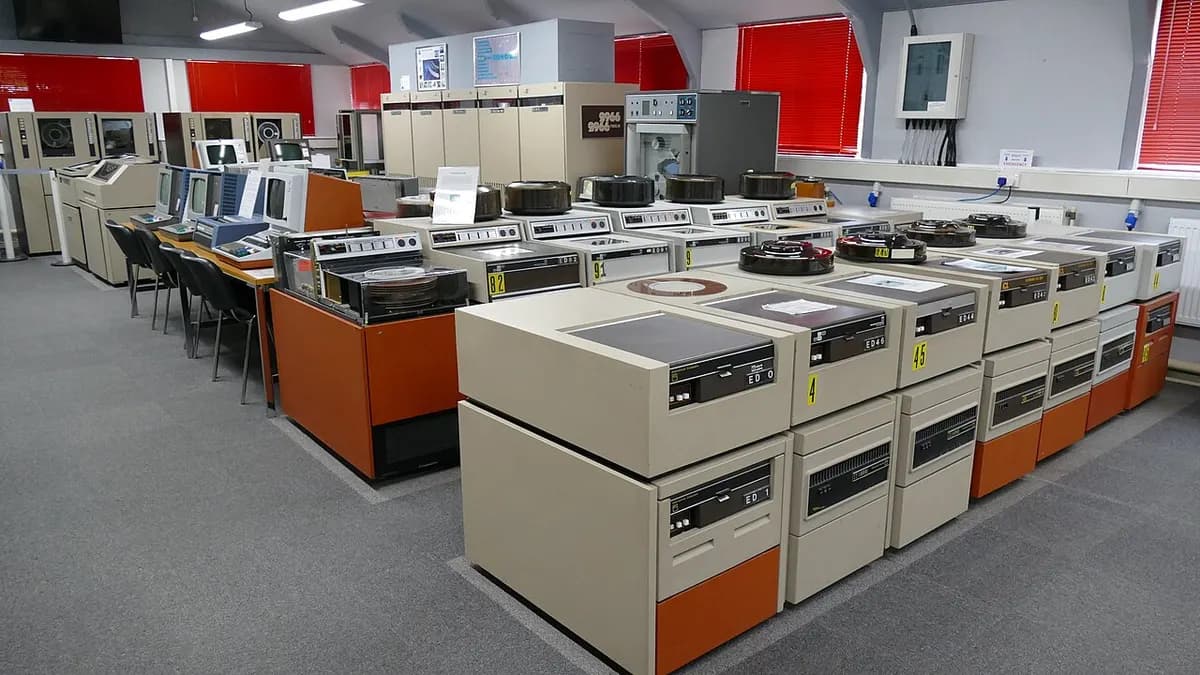
A legacy system is software, or the hardware it runs on, that a business still depends on but can no longer change, secure or support with confidence. The legacy system meaning that matters in practice is about risk and changeability, not age. A system becomes legacy when the cost and danger of touching it start to decide what the business can and cannot do. That is why a twenty-year-old system with tests, current dependencies and three people who understand it can be perfectly healthy, while a three-year-old one built on an abandoned framework by a contractor who has left is legacy already.
Legacy system meaning: a definition that holds up
The usual definition of a legacy system is "outdated technology that is still in use". It is not wrong, but it does not help you decide anything, because "outdated" is largely a matter of fashion.
The definition I find more useful is a set of three questions. If the answer to any of them is no, you are dealing with a legacy system, whatever its age.
- Can you change it safely? A small change should be small: made, tested and released without a week of anxiety. If nobody will touch a module because nobody knows what else it will break, that module is legacy.
- Can you keep it supported? Every layer underneath the system, from the operating system to the language runtime to the libraries, either has someone publishing fixes for it or does not. Once a layer stops receiving security patches, the system is carrying risk it cannot shed.
- Does more than one person understand it? If the knowledge of how it works lives in one head, or in nobody's, the system is one resignation away from being unmaintainable.
Michael Feathers gave a blunter version in his book Working Effectively with Legacy Code: legacy code is simply code without tests. Without tests you cannot know whether a change broke something, so every change is a gamble.
Notice what is missing: the year it was written and the programming language. Age correlates with being legacy because support windows close and people move on. It is not the cause.
Examples of legacy software systems
Legacy software systems come in more shapes than the mainframe in the basement. These are the forms that turn up most often:
- The mainframe core. COBOL batch programs in banks, insurers and government departments, processing accounts and payments overnight. Often extremely reliable, and legacy mainly because the people who understand them are retiring.
- The desktop database. A Microsoft Access or Visual Basic 6 application that began as one person's tool and now runs a department. It often lives on a single office machine, with no tests and no source control.
- The web application on a dead runtime. Software that still works but sits on a version its maintainers no longer patch. Python 2 reached end of life in January 2020 and AngularJS at the end of 2021, and applications written for both are still running.
- The over-customised ERP. An on-premise enterprise package modified so heavily that it can no longer take the vendor's upgrades, so it stays frozen on an old release.
- The spreadsheet that became a system. A workbook full of macros that holds live operational data and that one person understands. It fails all three tests above, which makes it a legacy system even though nobody calls it one.
- The young orphan. A recent build on a current stack, with no documentation and no tests, written by a team that has since gone. Modern technology, legacy risk.
A review that only looks for old technology will walk straight past the last two.
What are the problems with legacy systems?
The problems with legacy systems are rarely that they stop working. They are that the business gradually loses the ability to respond: to a vulnerability, to a new requirement, to a departure. Five causes come up again and again.
Security patches stop arriving
When an operating system, runtime or framework version reaches end of support, vulnerabilities found afterwards are published but not fixed for you. The system does not become insecure overnight. It becomes a little less secure every month, with no route back short of an upgrade.
Hiring gets harder and slower
Engineers who know an ageing stack become fewer each year, and most people early in their careers do not want to build their experience on one. You can still hire, but it takes longer, the pool is narrower, and new joiners need more time before they can change anything safely.
Integration becomes a project every time
Modern tools expect to talk to each other through an API. Many legacy systems predate that assumption, so connecting them to a payment provider, a CRM or a reporting tool means file exports, screen scraping or direct database access. Each integration is custom, fragile and understood by one person.
The vendor declares end of life
For bought software the timetable is not yours. The vendor announces that a version will no longer be sold, then no longer supported, and your choices narrow to an upgrade on their terms, a migration on yours, or running unsupported. Where the product has been heavily customised, the upgrade path may not exist at all.
The knowledge is held by one person
In my experience this is the most common problem and the most underestimated. The system works because one long-serving developer or administrator knows which job to restart, which table must never be edited by hand, and why month-end needs a particular sequence. None of it is written down. The system is stable only for as long as that person stays, stays well and stays interested.
These five feed each other. Unpatched software makes integration riskier, hard hiring concentrates knowledge further, and concentrated knowledge makes every upgrade more frightening. It is technical debt in its plainest form: each year of deferral raises the price of the eventual fix.
Working through this on a real project?
Tell us what you are building or fixing. A senior engineer will give you a straight view of it, including when the honest answer is that you do not need us.
Legacy ecommerce technology challenges
Online shops meet these problems in a sharper form, because the system takes money and faces the public internet. The legacy ecommerce technology challenges I would check first are these:
- Platform end of life. Magento 1 is the standard example: official support ended in June 2020, and stores that stayed on it stopped receiving security fixes from the vendor.
- Payment compliance. If you accept card payments, PCI DSS applies to you in some form, and it expects known vulnerabilities to be patched. An unsupported platform makes that hard to demonstrate. Payment providers also retire old API versions and old encryption protocols, so an untouched checkout can stop working through no change of your own.
- Extensions and customisations that pin the version. A plugin whose author has stopped maintaining it, or changes made directly to core files, can block a platform upgrade, so upgrades stop happening.
- Brittle connections. Stock, pricing and orders often flow to a warehouse or accounting system through nightly files, which shows up as overselling and late order updates.
- No safe time to change. A shop has peak seasons, so the window for risky work is short and easy to miss for another year.
The fix is not always a new platform. Sometimes it is an upgrade within the platform you have, and sometimes it is a move. That choice is better made deliberately, with someone who does e-commerce development, than under pressure after an incident.
Why legacy systems survive
Most legacy systems survive because they are doing their job, and the reasons are good ones. Whether one stays healthy is mostly a question of software maintenance and support.
- They work. A system that has processed real transactions for fifteen years has been tested harder than any replacement will be before its launch.
- They hold the business rules. Pricing exceptions, regulatory edge cases, the special handling for one large customer: often the only complete record of how the business operates is the code. Nobody can write that down from memory, which is what makes replacement risky.
- They are paid for. The running cost is known and usually modest. The replacement cost is large and uncertain.
- Everything else leans on them. Reports, integrations and daily habits are built around the system's quirks. Replacing it means changing all of those too.
So a legacy system is nothing to be embarrassed about. It is usually a successful system that has outlived the conditions that made it easy to look after. The useful question is never "is it old?" It is "what is this costing us, and what could it cost us?"
The options in brief: retain, rehost, refactor, replace
There are four broad things you can do with a legacy system. You will see longer lists, often called the six or seven Rs of migration, but these four cover the decision.
| Option | What it means | When it fits | Main risk |
|---|---|---|---|
| Retain | Keep it as it is and contain the risk around it | It is stable, blocks nothing important, and the risk can be fenced off | Deferral turns into neglect |
| Rehost | Move it to new infrastructure with the code largely unchanged | The hardware or data centre is the problem, not the software | You pay to move the same problems |
| Refactor | Improve it in place: add tests, upgrade versions, restructure the worst parts | The business logic is valuable and the foundations can be saved | Slow, and it takes discipline to finish |
| Replace | Retire it in favour of a new build or a bought product | The foundations cannot be saved, or a product now does the job | Losing rules nobody knew were there |
Retaining is a real option, not a failure to decide, provided you do the containing: isolate the system on the network, restrict who can reach it, back it up properly, and document what the one person knows. Rehosting buys time and removes hardware risk, but most of the danger sits in the switch itself, which I cover in cloud migration risk is in the cutover, not the platform.
Choosing between refactoring and replacing is the hard part, and the answer is usually to do it in pieces instead of all at once. That argument has its own article: when to modernise legacy software, and when not to.
How to assess a legacy system
Before choosing an option, find out what you actually have. A useful assessment answers six questions with evidence instead of opinion.
- What does it do, and what depends on it? List the functions, the integrations, the reports and the teams. Include the informal ones, such as the export somebody downloads every Friday.
- Is every layer still supported? Write down the version of the operating system, runtime, framework, database and main libraries, and check each against the maintainer's published support dates. For bought software, check the contract and the vendor's roadmap.
- How hard is a small change? Pick a trivial change and trace it from request to production. Can the code be built from source? Are there tests? Can a release be rolled back? The elapsed time for something trivial is the most honest measure of changeability you will get.
- Who understands it? Name the people. If the list has one name on it, capturing what they know is the first job, ahead of any technical work.
- What does it cost to run, and what would failure cost? Licences, hosting, support contracts and the hours lost to workarounds on one side. On the other, a realistic account of a day's outage or a breach.
- Which parts are the problem? Legacy is rarely uniform. Often one module or one integration carries most of the risk, and the rest can be retained.
The output should be short: a list of components, each with its support status, its risk and a recommended option. The same questions sit at the centre of technical due diligence, because a buyer wants to know exactly this about a system they are about to own.
If the assessment points towards moving off the system, our legacy application migration work starts from the same inventory.
Legacy system FAQ
What is the definition of a legacy system?
A legacy system is software or hardware that an organisation still relies on but cannot easily change, secure or support. The common definition of a legacy system stresses outdated technology. The more useful one stresses risk: unsupported components, no tests, and knowledge held by too few people.
Is a legacy system always old?
No. Age makes legacy status more likely, because support ends and people leave, but a recent system with no tests, no documentation and no remaining author is legacy in every way that matters. An old system that is tested, patched and understood is not.
What are examples of legacy software systems?
Typical legacy software systems include COBOL applications on mainframes, Access and Visual Basic desktop tools, web applications on unsupported runtime versions, heavily customised on-premise ERP installations, online shops on retired platform versions, and business-critical spreadsheets.
What are the main problems with legacy systems?
The main problems with legacy systems are security patches that no longer arrive, difficulty hiring people who know the technology, integrations that are slow and fragile to build, vendor end-of-life deadlines, and operational knowledge concentrated in one person.
Should a legacy system always be replaced?
No. Many should be retained with the risk contained, and others are better refactored or rehosted. Replace only when the foundations cannot be saved or a product now does the job better, and decide component by component.