
The question we are asked most often about VICIdial is what server it needs. The honest answer is that agent count is a poor predictor on its own, and sizing against it is why so many installs run beautifully in testing and then degrade at exactly the moment the campaign gets busy.
What actually determines load is how hard the system is worked: how many calls per second are being placed, how large the lists are, how aggressively the hopper is refilled, whether recording is on, and how many concurrent database writes that adds up to. Twenty agents on a hard predictive campaign with recording will work a box considerably harder than forty agents doing preview dialing.
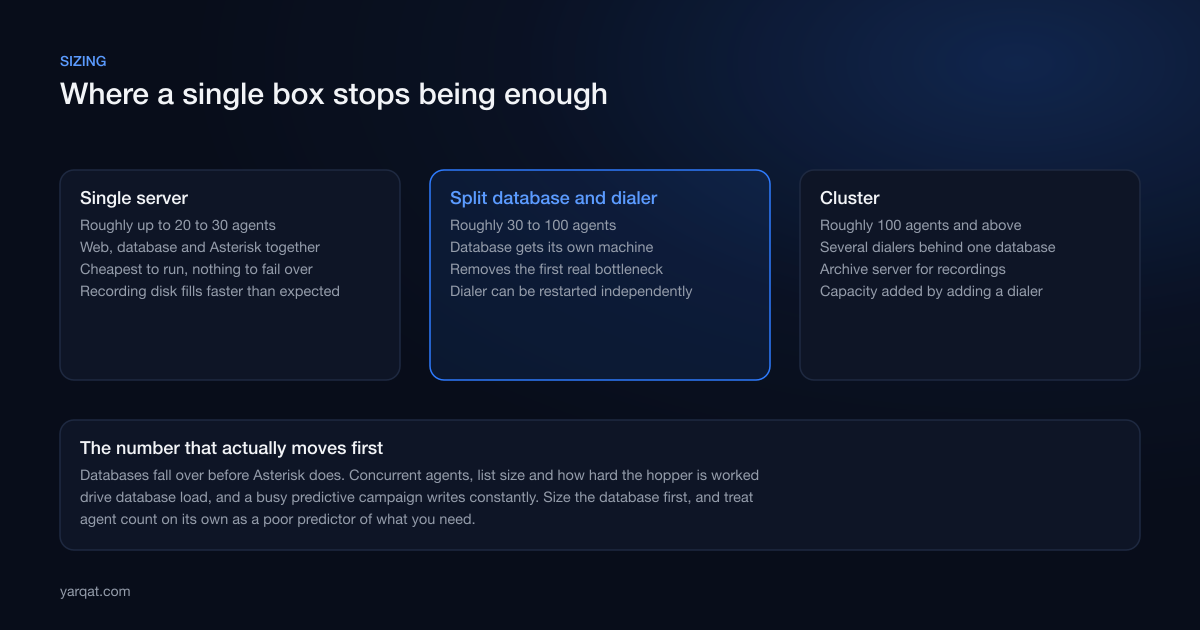
The three tiers, roughly
Single server
Everything on one machine: web, database and Asterisk. This is fine for something in the region of twenty to thirty agents, and it is the cheapest thing to run. The trade is that a database problem, an Asterisk problem and a web problem all present as the same symptom, which makes diagnosis slower, and there is nothing to fail over to.
Database split from the dialer
The first upgrade that actually helps is giving the database its own machine. This is the right shape from roughly thirty agents upward, and it removes the bottleneck that people usually blame on Asterisk. It also means you can restart the dialer without touching the database, which matters more than it sounds when you are trying to fix something during working hours.
Cluster
Past roughly a hundred agents you want several dialers sharing one database, with recordings moved off to an archive server. Capacity is then added by adding a dialer rather than by rebuilding. We cover the shape of that in scaling VICIdial past one server.
What to spend money on, in order
- Disk speed for the database. This is the highest-value pound you will spend. VICIdial's write pattern is constant and small, which is exactly the workload where slow storage shows up as everything feeling sluggish. Solid-state storage is not optional for a busy install.
- RAM for the database. Enough that the working set stays in memory rather than being read from disk repeatedly. Lists and call logs grow, so what was comfortable in month one may not be in month twelve.
- CPU for the dialer. Asterisk is not especially demanding until you add transcoding. If your carrier and your agents can agree on a codec, you avoid a great deal of CPU cost. If they cannot, you pay for it on every concurrent call.
- Network quality over network speed. Voice needs consistency, not bandwidth. A connection with plenty of headroom but variable latency will sound worse than a slower, steadier one. Jitter and packet loss are what agents describe as "the line is bad".
- Disk capacity for recordings. Always more than the estimate. Recordings accumulate silently and then fill the disk, which takes the whole system down rather than just recording.
Working through this on a real project?
Tell us what you are building or fixing. A senior engineer will give you a straight view of it, including when the honest answer is that you do not need us.
The mistakes that cause the most damage
Sizing for today's agent count
Call centres do not grow smoothly, they grow in steps when a new campaign lands. Size for the next step, not the current one, because the upgrade path is far more disruptive once there is live data and running campaigns.
Leaving the database on defaults
A default MySQL or MariaDB configuration is tuned for a general workload on a modest machine. It is not tuned for your dialer, and the gap between a default configuration and a considered one is often the difference between a system that copes and one that stalls under peak dialing. This is unglamorous work and it is where the biggest wins are.
Ignoring the recordings problem until the disk is full
Recording is usually a legal or quality requirement, so it goes on and is never revisited. Decide up front where recordings live, how long they are kept and how they move off the dialer, and monitor free disk space with an alert that fires well before it matters. A dialer that stops because a disk filled is an avoidable outage and a genuinely embarrassing one.
Virtualised on shared infrastructure
Voice is sensitive to timing in a way that most workloads are not. A noisy neighbour on oversubscribed shared hosting produces intermittent audio problems that are close to impossible to diagnose from inside your own server, because everything you can measure looks fine. Dedicated resources are worth paying for here.
How to tell whether your current install is under-sized
Some symptoms point at capacity rather than configuration:
- Agent screens are slow to update, particularly when the campaign is busiest
- Reports take progressively longer to run, or time out
- Calls connect but audio breaks up when concurrency is high, and is clean when it is not
- The dialer keeps up early in a shift and falls behind later
- Restarting things fixes the problem for a while, which is the classic sign of a resource being exhausted rather than a setting being wrong
If those look familiar, the fix is usually splitting the database out and tuning it, not reinstalling. Reinstalling on the same specification reproduces the same problem, which is how installs get rebuilt twice.
The short version
Size the database first, on fast storage, with enough memory for the data you will actually have in a year. Give the dialer its own machine as soon as you can justify it. Buy consistent network quality rather than raw speed. Decide the recording lifecycle before recordings become an outage.
None of this is exotic. It is the ordinary discipline that separates an install that carries a hundred agents from one that struggles at forty, and it is nearly always cheaper to do at build time than after a bad week.
We size and build VICIdial installs and we get called to diagnose ones that are already struggling. See call centre setup for how we approach it, or book a free consultation and we will tell you plainly whether your current server is the problem.